Workflow description
An overview of neptoon workflow
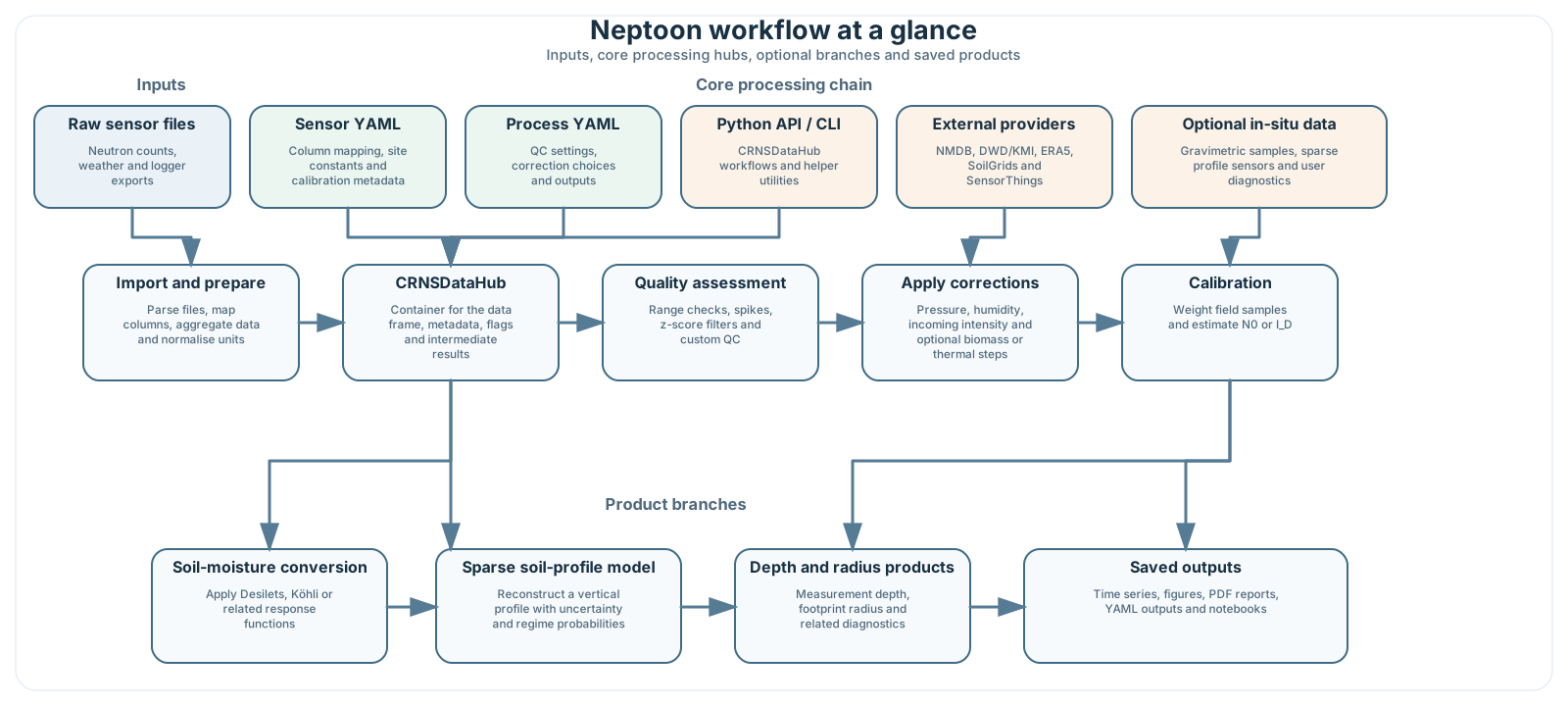
A more detailed set of generated overview figures is available in the visual workflow and physics guide.
So now we know a little about how these sensors work. Next we will outline the processing workflow in neptoon
Important
Re-calibration is needed if you change anything in the steps. For example, if you decide to test out a different method for incoming intensity correction or apply smoothing at a different point, the original N0 calibration term will be incorrect (it will be the N0 number when using your original methodology). It is always recommended to use the calibration step when changing things in the workflow.
Flow diagram
flowchart TD
    Raw[Raw Data] --> Parser[Parser]
    PrepData[Prepared Data] --> ImportBase[Import and Prepare Data]
    Parser --> ImportBase

    ImportBase --> |CRNS Data Frame| DataHub[CRNSDataHub]
    SensorInfo[Sensor Information] --> DataHub

    DataHub --> NMDB[Attach NMDB Data]
    NMDB --> QA[Quality Assessment]

    QA --> SelectCorr[Choose Corrections]

    SelectCorr --> ApplyCorr[Apply Corrections]
    ApplyCorr --> |Optional| Smooth1[Data Smoothing]
    ApplyCorr --> Calibrate{Calibrate?}
    Smooth1 --> Calibrate

    CalibData[Calibration Data] --> Calibrator[Calibrator]
    Calibrate --> |Yes| Calibrator
    Calibrator --> ProduceSM[Produce Soil Moisture]
    Calibrate --> |No - already calibrated| ProduceSM
    ProduceSM --> |Optional| Smooth2[Data Smoothing]
    ProduceSM --> CreateFigs[Create Figures]
    Smooth2 --> CreateFigs
    CreateFigs --> SaveData[Save Data]

    style Calibrate diamond
Above is a flow diagram representing the general workflow that is required for processing CRNS in neptoon.
Data Collection and Formatting
- First, we need some data :
-
Sensor Owners: You have raw sensor files that need to be parsed and formatted into a data frame ready for processing.
-
Researchers, Students, and Citizen Scientists: You may wish to collect publicly available data from the internet to try out some re-processing.
Routines have been developed which will help you import data of different types into neptoon.
Once you have collected the data, it needs to be prepared for use in neptoon. For example, the index of your data frame should be a datetime index (necessary for internal processes). We have written routines to streamline this process.
More information on data collection and formatting
Sensor Information
Neptoon needs to know a little about your site to process the raw data. For example:
- What is the bulk density of the soil?
- What are the latitude and longitude of the site?
These values are used when converting neutron counts to soil-moisture estimates. Some values can be calculated by neptoon; others must be supplied by the user.
More information on providing sensor information
The CRNSDataHub
Linking all these steps together is the CRNSDataHub.
The CRNSDataHub is so-called because it acts as our hub from which to process the CRNS data from. Each of the processing steps has been designed to be as modular as possible. The hub, however, acts as a central location storing the information describing the site, time series data, flagging data for poor quality data, calibration data (if you need to calibrate), and outputs from each of the steps. You'll notice its usage in the example ipython notebooks in the examples
Attach Neutron Monitoring Database (NMDB.eu) data
One of the key correction steps in CRNS processing is account for changes in the overall intensity of incoming cosmic-rays. This has a direct influence on
Quality Assurance
Input data quality affects the final soil-moisture estimates. Neptoon uses the SaQC Python package for quality assurance and provides wrappers for common CRNS variables.
More information on quality assurance
Choosing Corrections
A key aspect of CRNS processing is correcting out the additional influences on the neutron signal aside from the influence of soil moisture dynamics. Over the years our understanding has continued to evolve meaning that how we originally corrected for these impacts is no longer the same.
We include old and new corrections in neptoon, and will expand the selection as new theories are presented.
- Sensor Owners - you likely want to process data with the most current understanding, and we provide a default option for this use case.
- Students and Citizen Scientists - perhaps you want to better understand the how different methods influence soil moisture estimates - we include all the theories ready for selection.
- Researchers - custom correction methods can be added to the processing pipeline without changing the core package code. This is an advanced feature and requires some Python knowledge; see write your own corrections.
More information on corrections
OPTIONAL: Calibrate the Sensor
Sensor calibration ensures we can convert the neutron values into soil moisture estimates. This is done by undertaking a calibration campaign. Traditionally this means collecting soil samples within the radius of influence of the sensor, oven drying the samples to get accurate values of soil moisture, and then comparing this to the count rate during the calibration campaign (see Schrön et al., 2017 for more on this).
This gives the N0 term: the theoretical count rate under dry conditions. N0 is required for absolute soil-moisture conversion; without it, the neutron series mainly supports relative changes. Calibration data should be used where available.
Once calibrated, this N0 term can be saved in a YAML file for future processing - or be directly provided with the Site Information. This means calibration needs only be done once.
More information on calibration
Produce Soil Moisture Estimates
Now that we have collected and formatted our data, supplied key information, undertaken quality assessment, calculated dynamic correction terms, and calibrated the sensor (phew), we are ready to see our soil moisture estimates.
This step takes all the information created from the previous steps and outputs our soil moisture values, as well as information on the depth and radius of the estimation.
More information on producing soil moisture estimates
Saving Data
Processed data can be saved with the time series, quality-assurance data, derived metadata, the PDF report and the DataAuditLog.
More information on data saving
Journalist/PDF
Making sense of all this data is a task in itself. That's why we also create an informative PDF file which gives an overview of the key information produced when creating data.
It's important to differentiate the PDF and the DataAuditLog. The DataAuditLog is only interested in processing steps, which means the output should be agnostic to the site being described.
The PDF provides information about the site itself, which can be useful to site owners and researchers alike:
- How many data points where removed in QA?
- What was the average SM across the seasons?
- Any interesting features a stakeholder should be aware of?
More information on the output PDF
The CRNSDataHub
Linking all these steps together is the CRNSDataHub.
The CRNSDataHub acts as the central container for CRNS processing. It stores site metadata, time-series data, quality flags, calibration data and final outputs, and it passes these objects between processing steps.